2026 Digital Privacy Checklist: Secure Your Online Identity Now

The 2026 Digital Privacy Checklist: 7 Essential Steps for US Citizens to Secure Their Online Identity Now (PRACTICAL SOLUTIONS)
In an increasingly interconnected world, the concept of privacy has evolved dramatically. What was once a simple matter of locking your doors and shredding sensitive documents now extends into the vast and often opaque realm of the internet. For US citizens, navigating this digital landscape requires more than just awareness; it demands proactive measures to protect one’s online identity and personal data. As we move further into 2026, the threats to our digital privacy are becoming more sophisticated, making a robust digital privacy checklist not just useful, but absolutely essential.
The digital footprint we leave behind, often unknowingly, can be a treasure trove for malicious actors, advertisers, and even state-sponsored entities. From the websites we visit to the apps we download, from our social media interactions to our online purchases, every click and every data point contributes to a comprehensive profile of who we are. This data can be exploited for identity theft, targeted advertising, political manipulation, and various other forms of exploitation. Therefore, understanding and implementing practical solutions to safeguard your digital life is paramount.
This comprehensive guide provides a digital privacy checklist tailored for US citizens in 2026, offering seven essential steps to fortify your online defenses. We’ll delve into practical, actionable strategies that you can implement today to enhance your digital security and reclaim control over your personal information. Each step is designed to address specific vulnerabilities and empower you with the knowledge and tools to protect your most valuable asset in the digital age: your identity.
1. Master Your Privacy Settings Across All Platforms
The first and most fundamental step in our digital privacy checklist is to take control of your privacy settings on every platform you use. This includes social media, email services, cloud storage, and even your operating system. Many services default to sharing more data than you might be comfortable with, often for the sake of ‘convenience’ or ‘personalization.’ It’s crucial to actively review and adjust these settings.
Social Media Platforms (Facebook, Instagram, X, TikTok, LinkedIn, etc.)
- Audience Control: Ensure your posts, photos, and personal information are only visible to the audience you intend. This often means setting your profile to ‘private’ or ‘friends only’ for personal content.
- Tagging and Location Services: Disable automatic tagging suggestions and restrict who can tag you. Turn off location services for social media apps unless absolutely necessary.
- Ad Preferences: While you can’t entirely escape ads, you can often limit the data used for targeting. Regularly review your ad preferences and clear your ‘ad interests.’
- Third-Party Apps: Audit and revoke access for any third-party apps connected to your social media accounts that you no longer use or don’t trust. These apps can often access a surprising amount of your data.
Email Services (Gmail, Outlook, Yahoo Mail, etc.)
- Two-Factor Authentication (2FA): Enable 2FA on all your email accounts. This adds an extra layer of security, making it significantly harder for unauthorized users to access your inbox even if they have your password.
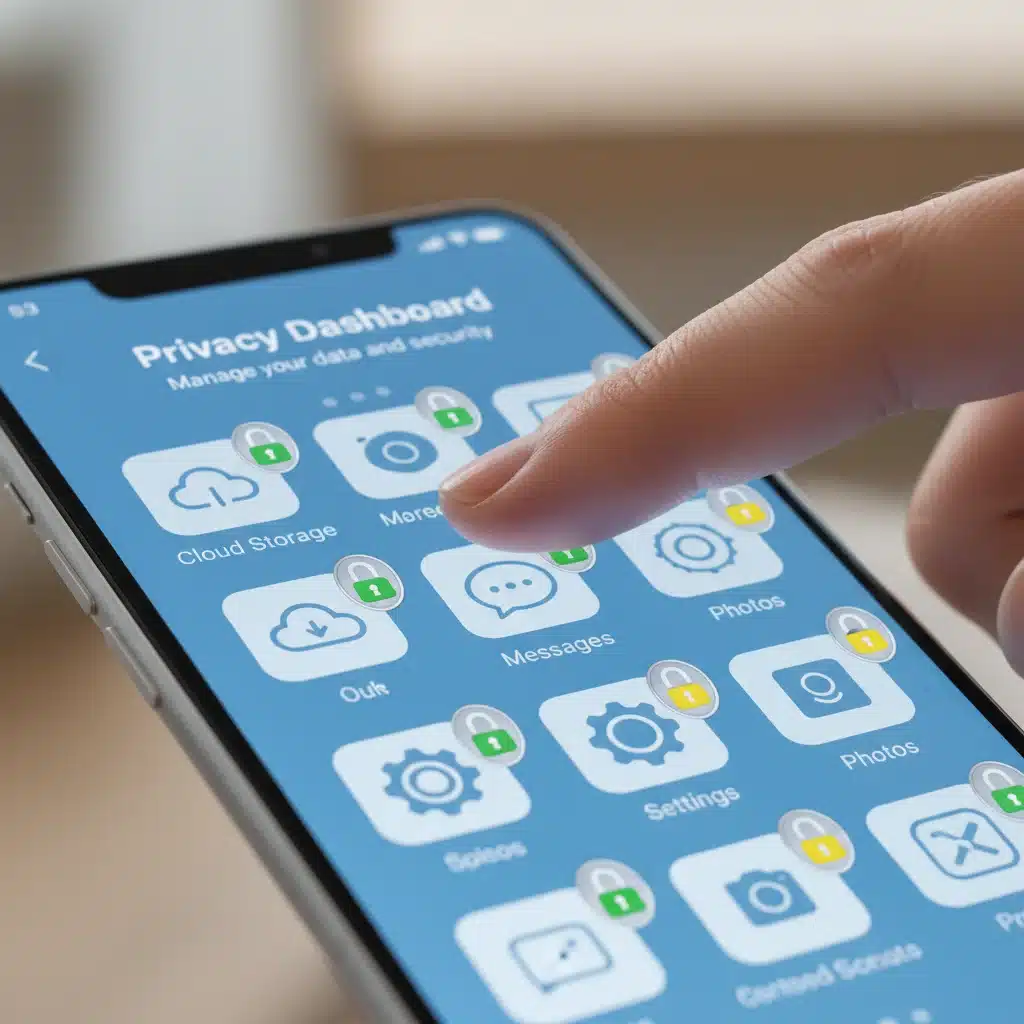
- Privacy Dashboard: Explore your email provider’s privacy dashboard (e.g., Google’s Privacy Checkup) to understand what data they collect and how you can manage it.
- Email Forwarding: Be cautious about setting up email forwarding, especially to less secure accounts.
- Spam Filters: Utilize and regularly update your spam filters to reduce phishing attempts and unwanted solicitations.
Cloud Storage and Other Services (Google Drive, Dropbox, iCloud, etc.)
- Sharing Permissions: Carefully review who has access to your shared files and folders. Restrict sharing to only those who legitimately need it.
- Encryption: While many cloud services encrypt data at rest and in transit, consider using client-side encryption for extremely sensitive documents before uploading them.
- Backup and Retention Policies: Understand how long your data is retained even after deletion and if backups are kept.
Operating Systems (Windows, macOS, Android, iOS)
- Location Services: Restrict which apps can access your location. Review this regularly, as apps often request location access without a clear need.
- Microphone and Camera Access: Control which applications can use your microphone and camera. Be wary of apps requesting these permissions if they don’t have a clear functional need.
- Diagnostic and Usage Data: Minimize the amount of diagnostic and usage data your operating system sends back to the developer.
- App Permissions: On mobile devices, regularly audit and revoke unnecessary permissions for installed apps.
Taking the time to meticulously go through these settings for each platform is a crucial, foundational step in building a robust personal digital privacy checklist. It empowers you to make informed decisions about your data and significantly reduces your exposure.
2. Embrace Strong, Unique Passwords and Multi-Factor Authentication (MFA)
Weak or reused passwords remain one of the easiest entry points for cybercriminals. This step in our digital privacy checklist is non-negotiable for anyone serious about online security.
Password Best Practices
- Length and Complexity: Aim for passwords that are at least 12-16 characters long and include a mix of uppercase and lowercase letters, numbers, and symbols.
- Uniqueness: Never reuse passwords across different accounts. If one account is compromised, all others using the same password become vulnerable.
- Password Managers: This is arguably the most effective tool for managing strong, unique passwords. Services like LastPass, 1Password, Bitwarden, or KeePass can generate complex passwords for you and store them securely, requiring you to remember only one master password.
- Avoid Personal Information: Do not use easily guessable information like birth dates, pet names, or common phrases.
Multi-Factor Authentication (MFA)
MFA, often referred to as two-factor authentication (2FA), adds an extra layer of security beyond just a password. Even if a hacker obtains your password, they would still need a second factor to gain access. This is a critical component of any effective digital privacy checklist.
- Types of MFA:
- Something you know: Your password.
- Something you have: A physical token, a smartphone app (like Google Authenticator or Authy), or a hardware security key (e.g., YubiKey).
- Something you are: Biometrics like a fingerprint or facial scan.
- Enable MFA Everywhere: Activate MFA on every service that offers it. Prioritize email accounts, banking, cloud storage, and social media.
- Hardware Security Keys: For the highest level of security, consider investing in hardware security keys. These physical devices offer strong protection against phishing and account takeovers.
Implementing strong passwords and MFA across all your online accounts is a monumental step towards securing your digital identity and is a cornerstone of any robust digital privacy checklist. It significantly raises the bar for potential attackers.
3. Understand and Limit Data Tracking and Collection
The vast majority of websites and online services track your behavior. This data is used for targeted advertising, personalization, and sometimes shared with third parties. Being aware of this tracking and taking steps to limit it is a key part of our digital privacy checklist.
Browser Privacy
- Privacy-Focused Browsers: Consider using browsers like Brave, Firefox (with enhanced tracking protection), or DuckDuckGo, which are designed with privacy in mind and block trackers by default.
- Browser Extensions: Install privacy-enhancing extensions such as uBlock Origin (ad blocker), Privacy Badger (blocks invisible trackers), and HTTPS Everywhere (ensures encrypted connections).
- Incognito/Private Mode: While useful for preventing local browsing history storage, remember that incognito mode does not prevent websites from tracking you or your ISP from seeing your activity.
- Clear Cookies and Cache: Regularly clear your browser’s cookies and cache. This logs you out of sites and removes tracking cookies.
VPNs (Virtual Private Networks)
A VPN encrypts your internet connection and routes it through a server in a different location, masking your IP address and making it much harder for third parties to track your online activity. This is a powerful tool in your digital privacy checklist.
- Choose a Reputable Provider: Select a VPN provider with a strong no-logs policy and a good reputation. Avoid free VPNs, as they often monetize by selling your data.
- Always On: Configure your VPN to always be on, especially when using public Wi-Fi.
Ad and Tracker Blockers
These tools prevent scripts from loading on websites that are designed to track your online movements and serve you targeted ads. They not only enhance privacy but also often improve browsing speed.
Review App Permissions
As mentioned earlier, regularly review the permissions granted to apps on your smartphone and computer. If an app doesn’t need access to your contacts, camera, or location, revoke those permissions. This is a simple yet effective step in your digital privacy checklist.
4. Secure Your Devices: Computers, Smartphones, and IoT
Your physical devices are the gateways to your digital life. Securing them is a critical component of any comprehensive digital privacy checklist.
Software Updates
- Operating System and Applications: Always keep your operating system (Windows, macOS, Android, iOS) and all applications updated to the latest versions. Updates often include critical security patches that fix vulnerabilities.
- Automatic Updates: Enable automatic updates whenever possible to ensure you’re always protected against the latest threats.
Antivirus and Anti-Malware Software
- Install and Maintain: Use reputable antivirus and anti-malware software on all your computers. Keep its definitions updated and run regular scans.
- Mobile Security: Consider mobile security apps for your smartphones, especially Android devices, which can be more susceptible to malware.
Device Encryption
- Full Disk Encryption: Enable full disk encryption (BitLocker for Windows, FileVault for macOS, or device encryption for Android/iOS) on all your devices. This protects your data if your device is lost or stolen.
Physical Security
- Strong Passcodes/Biometrics: Use strong passcodes, PINs, or biometric authentication (fingerprint, facial recognition) to lock your devices.
- Public Wi-Fi Caution: Avoid conducting sensitive transactions (banking, shopping) on public Wi-Fi networks unless you’re using a VPN. Public networks are often unsecured and susceptible to eavesdropping.
IoT (Internet of Things) Devices
Smart home devices, fitness trackers, and other connected gadgets can be significant privacy risks. This is an often-overlooked aspect of a thorough digital privacy checklist.
- Change Default Passwords: Immediately change the default passwords on all new IoT devices. Many devices ship with easily guessable or publicly known default credentials.
- Network Segmentation: If possible, place IoT devices on a separate guest network or a dedicated VLAN to isolate them from your main home network.
- Review Privacy Policies: Understand what data your smart devices collect and how it’s used.
- Disable Unnecessary Features: Turn off microphones, cameras, or location tracking features on IoT devices if they are not essential for their functionality.
5. Be Wary of Phishing and Social Engineering
Even the most advanced technical safeguards can be bypassed if you fall victim to phishing or social engineering attacks. Awareness and skepticism are crucial elements of your digital privacy checklist.
Recognizing Phishing Attempts
- Suspicious Emails/Messages: Be suspicious of unsolicited emails, texts, or calls asking for personal information, login credentials, or financial details.
- Grammar and Spelling Errors: Phishing attempts often contain poor grammar, spelling mistakes, or unprofessional formatting.
- Urgency and Threat: Phishing messages frequently create a sense of urgency or threaten negative consequences if you don’t act immediately.
- Fake Links: Hover over links (without clicking!) to see the actual URL. If it doesn’t match the expected domain, it’s likely a phishing attempt.
- Sender Verification: Double-check the sender’s email address. Even if it looks legitimate, a closer inspection might reveal subtle differences (e.g., ‘amaz0n.com’ instead of ‘amazon.com’).
Social Engineering
Social engineering relies on psychological manipulation to trick you into divulging information or performing actions you wouldn’t otherwise. This can happen over the phone, through email, or even in person.
- Verify Requests: If someone asks for sensitive information, especially if they claim to be from a reputable organization, independently verify their identity using official contact information (not the contact info provided in the suspicious communication).
- Think Before You Click: Before clicking on any link or downloading an attachment, pause and consider if it seems legitimate and expected.
- Don’t Be Pressured: Reputable organizations will not pressure you into divulging sensitive information immediately.
6. Regularly Review Your Digital Footprint and Data Brokers
Your digital footprint is the trail of data you leave online. Periodically reviewing and managing this footprint is a proactive step in your digital privacy checklist.
Search Engine Audits
- Google Yourself: Regularly search for your name, email address, and phone number on major search engines. See what information is publicly available about you.
- Remove Unwanted Information: If you find sensitive or outdated information, explore options to have it removed. This might involve contacting website administrators or using Google’s removal tools.
Data Brokers
Data brokers collect and sell personal information to other companies. This data can include your address, phone number, purchase history, income, and even health information.
- Opt-Out Requests: Many data brokers offer an opt-out process, allowing you to request that your information be removed from their databases. This can be a time-consuming process, but services like DeleteMe or Incogni can automate it for a fee.
- Understand the Landscape: Be aware of major data brokers (e.g., Acxiom, Experian Marketing Services, WhitePages, Spokeo) and their practices.
Old Accounts
- Delete Unused Accounts: If you have old accounts on websites or services you no longer use, close them. Each inactive account is a potential vulnerability.
- Review Privacy Policies: When signing up for new services, take a moment to skim their privacy policies to understand how your data will be used.
Managing your digital footprint is an ongoing process, but an essential one for maintaining your privacy in 2026. This step in the digital privacy checklist helps you understand and mitigate the spread of your personal data.
7. Stay Informed and Adapt to Evolving Threats
The digital landscape is constantly changing, with new technologies, threats, and privacy regulations emerging regularly. The final, continuous step in our digital privacy checklist is to remain informed and adaptable.
Follow Cybersecurity News
- Reputable Sources: Subscribe to newsletters or follow reputable cybersecurity blogs and news outlets. Organizations like the Electronic Frontier Foundation (EFF), KrebsOnSecurity, and the Cybersecurity and Infrastructure Security Agency (CISA) are excellent resources.
- Understand New Threats: Keep abreast of new types of malware, phishing scams, and data breaches.
Understand US Privacy Laws
- State-Specific Laws: Be aware of privacy laws in your state, such as the California Consumer Privacy Act (CCPA) or the Virginia Consumer Data Protection Act (VCDPA), which grant consumers specific rights regarding their data.
- Federal Regulations: Understand the implications of federal laws like HIPAA (health data) and COPPA (children’s online privacy).
Educate Yourself and Others
- Continuous Learning: Digital privacy is not a one-time setup; it requires continuous learning and adaptation.
- Share Knowledge: Help friends and family members understand the importance of digital privacy and guide them through implementing similar safeguards.
Regularly Revisit Your Digital Privacy Checklist
Treat this digital privacy checklist not as a one-off task, but as a living document. Schedule periodic reviews (e.g., quarterly or bi-annually) to ensure your settings are still optimal, your software is updated, and you’re aware of any new vulnerabilities or tools. The digital world doesn’t stand still, and neither should your privacy efforts.

The Future of Digital Privacy for US Citizens
As 2026 progresses, the conversation around digital privacy in the United States continues to intensify. With ongoing debates about federal privacy legislation, the role of big tech companies in data collection, and the impact of emerging technologies like AI and quantum computing on data security, the landscape is constantly shifting. For US citizens, this means that staying vigilant and proactive is more critical than ever. The responsibility for protecting personal data increasingly falls on the individual, making a detailed digital privacy checklist an indispensable tool.
We are witnessing a growing awareness among the public regarding data exploitation and surveillance. This increased awareness is driving demand for more transparent data practices and stronger privacy controls. However, legislative efforts often struggle to keep pace with technological advancements. This gap underscores the importance of individual agency in managing one’s digital life. By meticulously following the steps outlined in this digital privacy checklist, you are not just reacting to threats but actively shaping your own digital future.
Furthermore, the rise of sophisticated cyber threats, including state-sponsored attacks, ransomware, and increasingly clever social engineering tactics, means that a multi-layered approach to security is paramount. Relying on a single solution or a one-time setup is insufficient. The integrated strategy proposed by this digital privacy checklist – combining strong authentication, privacy-focused browsing, device security, and continuous vigilance – offers the most robust defense against the myriad of challenges posed by the digital age.
The conversation about privacy is also intertwined with economic and social factors. Our data is often exchanged for ‘free’ services, creating a complex economy where personal information has become a valuable commodity. Understanding this underlying dynamic helps to frame why a proactive digital privacy checklist is so vital. It’s about recognizing the value of your data and choosing how and with whom you share it, rather than passively allowing it to be collected and monetized.
Looking ahead, we can anticipate further innovations in privacy-enhancing technologies, such as decentralized identity solutions, homomorphic encryption, and differential privacy techniques. While these technologies promise to offer greater privacy at a systemic level, individual users will still need to understand how to leverage them effectively. Therefore, the principles embedded within this digital privacy checklist – control, awareness, and continuous education – will remain relevant, regardless of future technological shifts.
Conclusion: Your Empowered Digital Future
Securing your online identity in 2026 might seem like a daunting task, but by systematically working through this digital privacy checklist, US citizens can significantly enhance their protection. From mastering privacy settings and implementing robust authentication to understanding data tracking and guarding against social engineering, each step contributes to a more secure and private digital existence.
Remember, digital privacy is not a destination but an ongoing journey. The threats evolve, and so too must our defenses. By staying informed, regularly reviewing your practices, and adapting to new challenges, you can reclaim control over your personal information and navigate the digital world with confidence and peace of mind. Make this digital privacy checklist a regular part of your routine, and empower yourself to build a more private and secure online future.